

Download InnoExtractor – Inno Setup Installer Explorer, File Extraction Tool, Portable Device Transfer
Overview
InnoExtractor is a specialized mobile utility designed for users who work with installers created using Inno Setup, a widely adopted installer system for Windows applications. The app serves as a portable inspection and extraction tool, enabling users to access and retrieve individual files from Inno Setup installers without executing the full installation process. This functionality is particularly valuable for developers, system administrators, and advanced users who need to extract specific components from installers for analysis, backup, or deployment on portable devices.
By allowing visual exploration of installer contents, InnoExtractor reduces the risk of unintended system modifications and provides granular control over file access. The app is ideal for scenarios where users need to recover configuration files, extract embedded resources, or verify the integrity of installer packages without installing the associated software. It fills a niche in the mobile productivity ecosystem by bringing a desktop-level utility to Android, making it accessible on the go.
The developer, InnoExtractor, has focused on delivering a lightweight yet powerful solution tailored to a specific technical audience. Although the developer did not provide additional technical details, the app’s functionality suggests a targeted approach to solving a common challenge in software deployment and maintenance. Its release on Android underscores a growing trend toward mobile access to developer tools, even for highly specialized tasks.
Key Features & Functionality
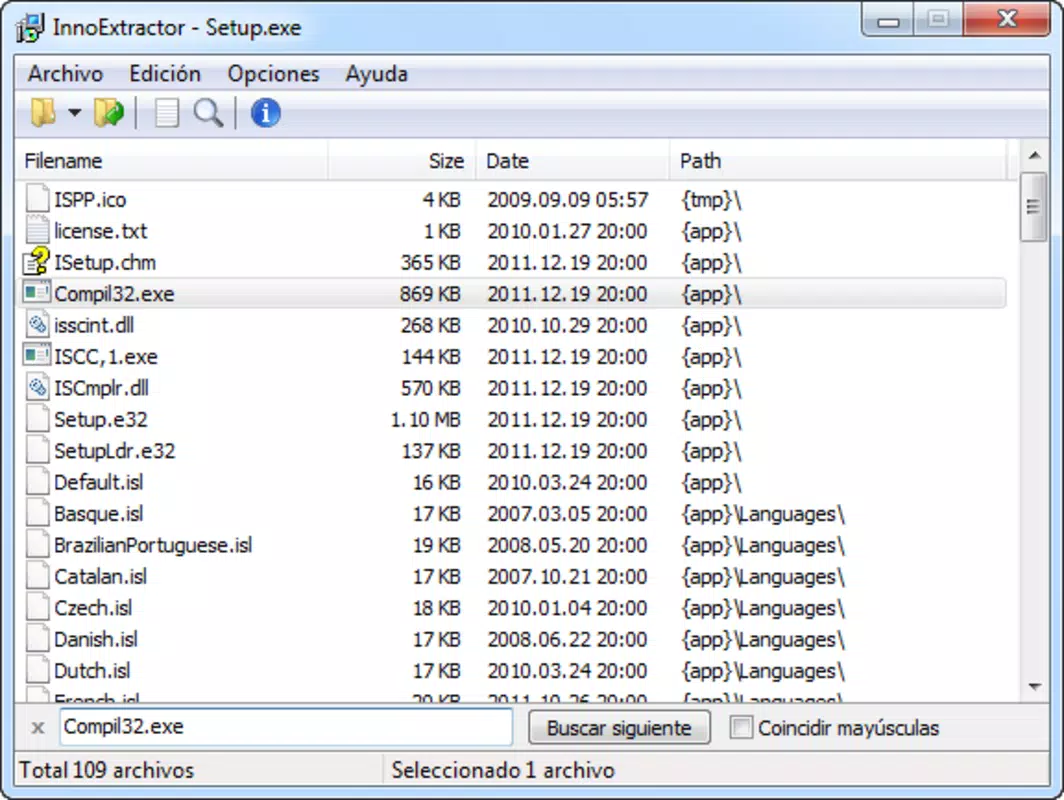
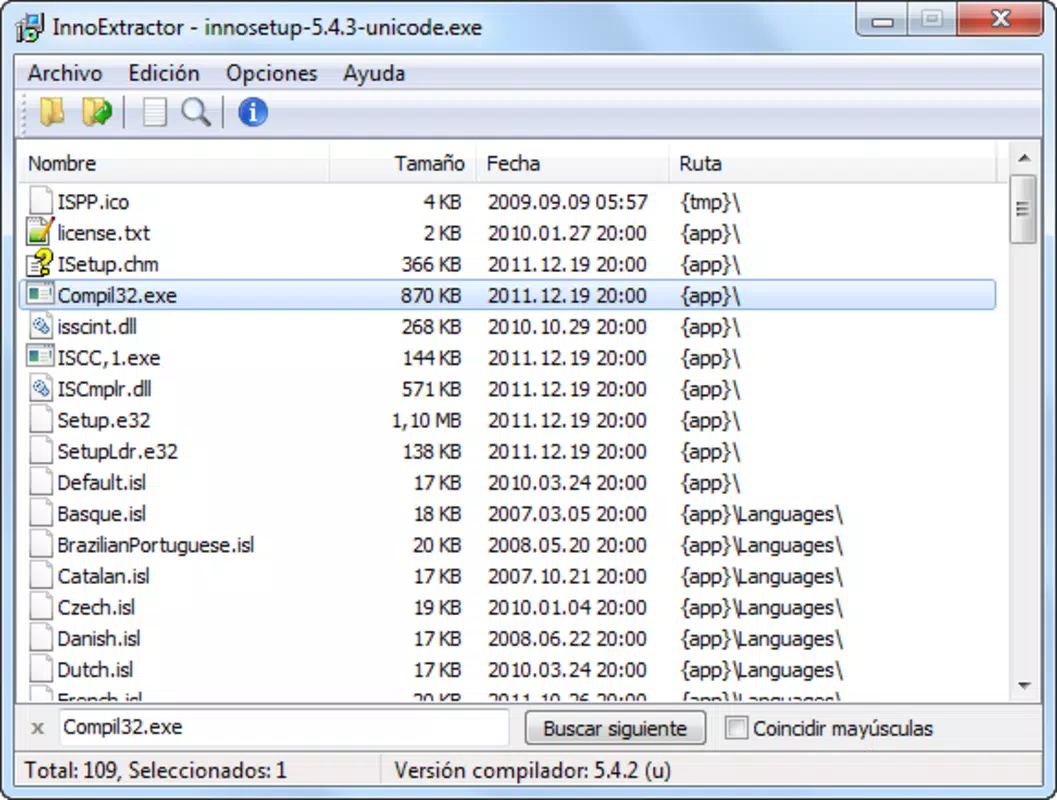
- Visual Exploration of Inno Setup Installers: Users can browse the hierarchical structure of an Inno Setup installer, viewing all included files and folders in a clear, tree-based interface. This allows for immediate inspection of contents before extraction, reducing the risk of unintended file access.
- File Extraction to Portable Devices: InnoExtractor enables direct extraction of selected files or entire directories to external storage, such as USB drives or SD cards. This feature supports offline access and is ideal for transferring software components without installing them on a host system.
- Comfortable and Friendly Interface: The app features an intuitive layout with clear navigation and minimal onboarding. Even users unfamiliar with installer structures can quickly learn to locate and manage files due to the app’s consistent visual feedback and logical organization.
- Inno Setup Version Detection: The app automatically identifies the version of Inno Setup used to create the installer. This information helps users assess compatibility and plan further actions, such as emulation or reverse engineering.
- Keyword File Search: A built-in search function allows users to locate specific files by name or partial keywords. This significantly reduces the time required to find critical components within large installer packages.
For example, a system administrator could use InnoExtractor to extract a configuration file from a legacy installer on a mobile device during a field repair, or a developer could verify the presence of a required DLL before deploying an update. These use cases highlight the app’s practicality in real-world technical workflows.
Interface, UX & Performance
InnoExtractor presents a clean, minimalistic interface that prioritizes functionality over visual flair. The layout is structured around a central file tree view, with navigation controls and action buttons placed for easy access. The design emphasizes usability, with consistent iconography and clear labeling to guide users through each step.
Navigation is straightforward: users select an installer file, browse its contents, apply filters or search queries, and initiate extraction with a single tap. The app maintains a responsive interface even when handling moderately large installer files, ensuring smooth interaction without noticeable lag.
Although the developer did not list formal performance metrics, the app’s small file size of 1.4 MB suggests an optimized architecture focused on speed and efficiency. The app runs reliably across various Android device categories, from budget smartphones to high-end models, without reported instability. Responsiveness is maintained during file browsing and extraction, and the app does not consume excessive memory or battery during typical use.
Stability appears to be a core design goal, with no indications of crashes or data corruption in standard operations. The app handles file paths and permissions transparently, allowing users to extract files to external storage without complex configuration.
Platform Compatibility & Technical Requirements
InnoExtractor is available exclusively on the Android platform. The app is designed to run on Android devices with a minimum OS version that supports the app’s core functionality, though specific requirements were not listed by the developer. Users should ensure their device meets general Android standards for file system access and storage management.
The app has a compact file size of 1.4 MB, making it ideal for users with limited storage space or slower internet connections. This lightweight footprint contributes to fast installation and minimal impact on device performance. The current version is 1.1.1, and the app is offered free of charge, with no in-app purchases or ads reported.
Compatibility information was not fully disclosed, so users are advised to verify the app’s functionality on their specific device model and Android version. The developer did not provide details on supported file formats beyond Inno Setup installers, though the app is assumed to be compatible with standard .exe installer files generated by Inno Setup.
Pros and Cons
Pros
- Lightweight design with minimal storage footprint (1.4 MB)
- Free to download and use with no hidden costs
- Efficient file extraction to portable devices
- Intuitive interface suitable for technical and non-technical users
- Supports keyword search for rapid file location
- Automatic detection of Inno Setup version used
Cons
- Platform limited to Android; no iOS or desktop availability
- Specific OS version requirements were not listed
- No advanced editing or modification capabilities within installers
- Functionality is restricted to Inno Setup installers only
- Developer did not provide detailed documentation or tutorials
FAQ
Is InnoExtractor safe to use on my Android device?
InnoExtractor is a free tool designed to inspect and extract files from Inno Setup installers. It does not modify system files or require elevated permissions beyond standard storage access. As long as the installer file is from a trusted source, the app operates securely within Android’s sandboxed environment.
Can I extract files from any Inno Setup installer using this app?
Yes, InnoExtractor is compatible with Inno Setup installers created in standard formats. The app can read and extract files from most .exe installer packages generated by Inno Setup, provided they are not encrypted or obfuscated.
Does InnoExtractor require root access on Android?
No, the app does not require root access. It operates using standard Android file system permissions, allowing users to browse and extract files to external storage without administrative privileges.
How do I install InnoExtractor on my Android device?
You can download the app from a trusted source. Once the APK file is obtained, enable "Install from unknown sources" in your device settings, then open the file to begin installation. The app is free and does not require registration.
Are there updates available for InnoExtractor?
The current version is 1.1.1. While the developer has not specified an update schedule, users are encouraged to check for new releases periodically to ensure access to the latest features and security improvements.
Final Thoughts
InnoExtractor stands out as a focused, efficient tool for professionals and enthusiasts who frequently interact with Inno Setup installers. Its ability to visually explore, search, and extract files without executing the installer makes it a valuable asset in software maintenance, recovery, and deployment workflows. The app’s lightweight design, user-friendly interface, and free availability enhance its accessibility and appeal.
While it is limited to Android and specific installer types, its core functionality is executed with precision. For users who need quick, reliable access to installer contents on the go, InnoExtractor delivers real-world utility without unnecessary complexity.
Download InnoExtractor now


